Enews Templates - template for news blog

Thursday, November 4, 2010


Update : If your slider can't work ,you can download the fixed version with download link provided in this post . You can see herefor solution if you don't want to re-install this template

Update 1: find this code
I was inspired by two Joomla template : Worldnews (from Gavick) and Teline (joomlart) ,so I design this template . It's named Simplex Enews . It's clean and simple , widget and ads slot ready for you .
You can take a look on screenshot bellow


Live Demo | Download


Do you like it ? if you answer 'yes' and wanna install this template ,here is my instruction :

1,Download template file .

2,Open template in any word editor you have

3, To change logo ,find this code :

#image-logo a { background:url(http://img828.imageshack.us/img828/6954/simplexenews.png) no-repeat left -5px; width:300px; height:100px; text-indent:-5555em; overflow:hidden; }
and change the url of background image to your logo url

4, To change social network link ,find this code :


Change the links in href attribute to your social network account .
5,To show categories in homepage ,find this code

label1 = "world";
Title1 = "WORLD";

label2 = "US";
Title2 = "US";

label3 = "entertainment";
Title3 = "Entertainment";

label4 = "business";
Title4 = "Business";

label5 = "Sports";
Title5 = "Sports";

label6 = "tech";
Title6 = "Technology";

label7 = "Feature";
Title7 = "Feature";

label8 = "Topnews";
Title8 = "Latest News";

label9 = "headline";
Title9 = "Headline";

label10 = "editor";
Title10 = "Editor's picks";

label11 = "story";
Title11 = "Top Stories";
position of each label showed in picture bellow

You can change the value of each label from label1 to label11 to the category you want to show in homepage .For example ,you want to show the category 'world' in possition of label1 ,change the value of label1 to 'world' .
Or if you want to show category ' xyz ' to slider in homepage ( position of label7) ,just change the value of label7 to 'xyz' .
Title is the text that showed as title of category in homepage .Change it to what you want .

6, To add photos from your Flickr to blog ,just find this code :


and change the value of id from '37304598@N02' to your flickr account id .

7,
To change the bio of writer


8,Go to Blogger Dashboard,continue to Page element .

9,To show category in navigation bar ,click on edit button on menu widget and add link to your category . Link to a category in Blogger has structure : "http://your blog. blogspot.com/search/label/your_category"
Do the same for category bar in footer and sidebar .

10,To add video ,click on video wiget ,and paste the embed code of video ,the size for video is 280x250 ,so you need to adjust your embed code for showing video at this size .

11,There are many ads widgets ,you can click on edit link in each widget for adding your ads code .

12,Save template and you are done .

Ps: many of my templates using fluid width ,so elements will be mess up if they have no content . I can use fixed size for making an element stick in a specific position ,but they won't show yours content enough if it longger than element size or size of browser windows are different .
So if you see your blog messed up after install ,pls make some content ,and it will show up .For example ,if your blog has only 6 post ,to see template in well condition ,pls add the same label to 6 posts ,and change value of all label variables (from label1 to label11) in step 5 to this label ,you will see elements in its position .
This way applied to all of my template if you see it messed up .

Note : if you don't see page navigation bar in bottom of category page (Newer posts,older posts,home) ... You can :
-Open template in word editor ,find '.pagenavi' and it will lead you to CSS code of page navigation bar ,add these attribute : text-align:center;clear:both;
-Find
and delete id='blog-pager' to

I also change download link to fixed version .
Read more »

Kreativ - Blogger Template

Wednesday, November 3, 2010


Kreativ | Blogger Template is another beautiful blogger template which is modified and converted from WordPress template made by BeatTeme.Com.

Kreativ | Blogger Template is a simple nice looking and creatively designed blogger template for those who are actively blogging.

It has a nice font format with beautiful sidebar it also got an introduction widgets in front and two navigation menus


So this template contains two version
  1. Kreativ Full Version
  2. Kreativ Without Post Summery Version
Source: Bestheme.net
Read more »

Instructions for Premium Blogger Dashboard Template

Monday, November 1, 2010

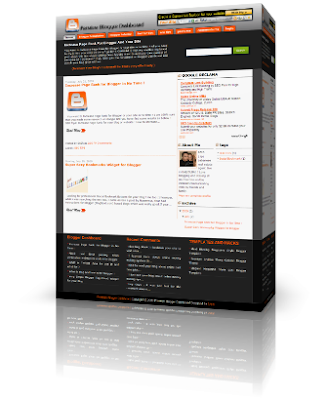
Premium Blogger Dashboard Template

DEMO ------- DOWNLOAD

It has many beautiful functions ! the first on is the rounded menu navigation on the top of the featured post and the search bar !
The second function is the automatic read more  ! actually this hack was the latest and the most popular was made for automatic post summary till now !
 
another great function which is P.B.D. THEME has related post widget ! why do we need for related post widget ? actually we do need it for keeping our visitors on our site while we can provide them another posts related to ! which’s great function for me !
for the menu navigation you need to change the links to your needed links ! that’s is ! 
<ul>
<li class='current_page'><a expr:href='data:blog.homepageUrl' title='Home'><span>Home</span></a></li>
<li><a href='http://blogger-dashboard.blogspot.com/search/label/Blogger%20Templates' title='Blogger Templates'><span>Blogger Templates</span></a></li>
<li><a href='http://blogger-dashboard.blogspot.com/search/label/Blogger%20Tutorial' title='Blogger Tutorial'><span>Blogger Tutorial</span></a></li>
<li><a href='http://blogger-dashboard.blogspot.com/search/label/Twitter%20Tips' title='Twitter Tips'><span>Twitter Tips</span></a></li>
<li><a href='http://blogger-dashboard.blogspot.com/search/label/SEO%20Tips%20and%20Tricks' title='SEO TIPS'><span>SEO TIPS</span></a></li>
<li><a expr:href='data:blog.homepageUrl + &quot;feeds/posts/default&quot;' title='Posts RSS'><span>Posts RSS</span></a></li>
<li><a expr:href='data:blog.homepageUrl + &quot;feeds/comments/default&quot;' title='Comments RSS'><span>Comments RSS</span></a></li>
<li><a href='http://www.blogger.com' title='Login'><span>Login</span></a></li>
</ul>
Update For Premium Blogger Dashboard theme!
Actually I wasn’t sure about the previous search bar ! than I created this new one :) and as per the first comment request than I have made some other changes for example the post title font !


another update which is Subscribe to RSS widget !
i forgot to post the subscription widget ! so here it is enjoy :)
<a href="http://feeds.feedburner.com/BloggerDashboard"><img alt="feedburner" style="border: 0pt none ; margin-top: 15px;" src="http://lh4.ggpht.com/_9b1traaMESE/SmDYssZpwFI/AAAAAAAAALs/g17Vr4lP_sY/Rss%20feeds%20icon%203222.png"/></a><!-- AddThis Button BEGIN -->

<div expr:addthis:url="data:post.url" class="addthis_toolbox addthis_default_style" expr:addthis:title="data:post.title"><a share="[object Object]" class="addthis_button_compact at300m" href="http://www.addthis.com/bookmark.php?v=250&amp;pub=saer_gh" ost="1" conf="[object Object]"><span class="at300bs at15t_compact"></span>Share</a> <span class="addthis_separator">|</span> <a share="[object Object]" class="addthis_button_facebook at300b" ost="1" conf="[object Object]" title="Send to Facebook"><span class="at300bs at15t_facebook"></span></a><a share="[object Object]" class="addthis_button_myspace at300b" ost="1" conf="[object Object]" title="Send to MySpace"><span class="at300bs at15t_myspace"></span></a><a share="[object Object]" class="addthis_button_google at300b" ost="1" conf="[object Object]" title="Send to Google"><span class="at300bs at15t_google"></span></a><a share="[object Object]" class="addthis_button_twitter at300b" ost="1" conf="[object Object]" title="Tweet This"><span class="at300bs at15t_twitter"></span></a><script src="http://s7.addthis.com/js/250/addthis_widget.js?pub=saer_gh" type="text/javascript"></script><!-- AddThis Button END --><a alt="Subscribe using any feed reader!" href="http://www.addthis.com/feed.php?pub=saer_gh&amp;h1=http%3A%2F%2Fblogger-dashboard.blogspot.com%2Ffeeds%2Fposts%2Fdefault&amp;t1=" target="_blank" onclick="return addthis_open(this, &#39;feed&#39;, &#39;http://blogger-dashboard.blogspot.com/feeds/posts/default&#39;)"><img style="border-right-width: 0px; border-top-width: 0px; border-bottom-width: 0px; border-left-width: 0px" alt="Subscribe" width="125" src="http://s7.addthis.com/static/btn/lg-feed-2-en.gif" height="16"/></a><script src="http://s7.addthis.com/js/250/addthis_widget.js?pub=saer_gh" type="text/javascript"></script></div>


how to install the widget on your Blogger ?


On Blogger when you're viewing your blog: Select customize => Layout tab => add a gadget => basics => scroll down to HTML/Javascript => copy and paste the widget code and you should be set!


Very Important Update !


Referring to this comment from one of premium blogger dashboard template !some users had some error with lower section after the post where is the footer should be showing ! so here is the solution !


find the main-wrapper in your template  and change the padding : 0 5px 0 5px; to padding:0 5px 10em; and your done ! but if u still having problem just let me know .thanx:)


notice : I advice you guys who download the template before 1 august 2009 !than you may need to download the template again for better improvements and fixed !


Actually Premium Blogger Dashboard Template is my first creation ! so be patient with me if you have any suggestion on the template just write your comment bellow  and i will try to figure it out ! ok GUMGUMs :)


Source: blogger-dashboard.blogspot.com
Read more »


Copyright © 2010 Blogger Tips And Tricks | Affiliate Marketing | Make Money Blogging. All Rights Reserved. Using Xclear Theme | Bloggerized by Themescook Developed by Helios | Powered by Blogger